 Stockbeam
Know what to order, and what it will cost.
Stockbeam works out how many of each product to reorder from your Shopify sales and your supplier’s lead time, and shows the working behind every number. It suits a one-person shop as much as a bigger team.
Install from the Shopify App StoreFree for up to 1,000 SKUs. A SKU is one product variant, so each size and colour combination counts as one. Above that it is $15 a month, with a 14-day free trial of the paid plan.
How many should I order?
Three Locking Carabiners left, and a supplier who takes 14 days. Stockbeam says order 360.
The forecast panel shows when to reorder: about 7.5 sold a day over a 14-day lead time, plus a safety buffer of 29, makes a reorder point of 134. The suggested order shows how many: enough for the 14-day lead time and the days of stock you order after it, plus the buffer, less the 3 on hand and anything already on order, rounded up to the supplier’s case size. Trust it or change it.


What will this order cost me?
Pick lines from the reorder list and Stockbeam makes one purchase order for each supplier. Goods £1,160.30, tax £232.06, and the total is on the page before you send it.
Press send and Stockbeam emails it to the supplier with the PDF attached. You can also download it or print it.
Has it all arrived?
Four-Person Tents: 96 ordered, 40 in. Receive the other 56 when the van comes back, with a lot code if you use them. A delivery recorded wrongly can be undone.


Is the shelf what the system says?
Count a shelf or a whole location. Two lines match, two are over and three are under, so the net is 5 units short. Nothing in Shopify changes until you save the count to Shopify.
Smaller jobs that sit around the ordering.
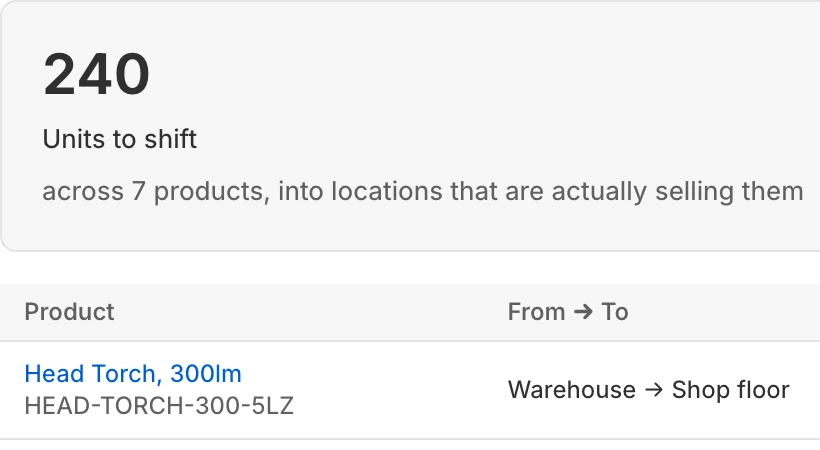
240 units worth moving
See where stock is sitting unsold in one location and another is short, with a quantity to send.

Gift boxes and what’s inside
A Climbing Gift Box holds a harness, a chalk bag and two Locking Carabiners. Box sales count toward reordering the items inside, and boxes already made count as stock of them. How bundles work
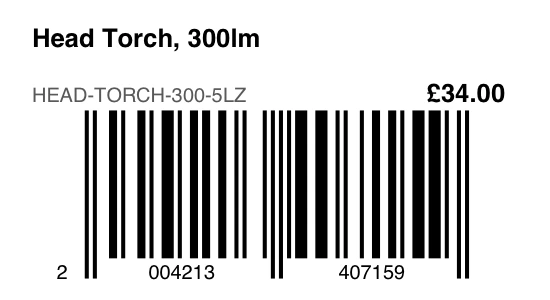
Barcode labels
Name, price and barcode on standard label sheets.
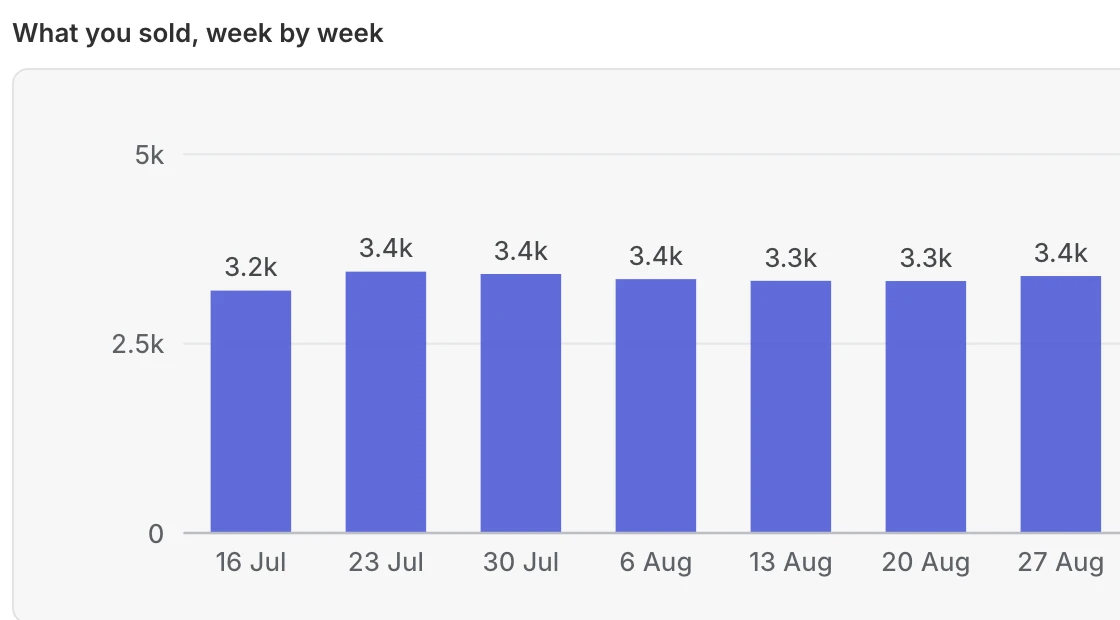
What you sold, week by week
Units sold each week, from about 3,200 to 3,400 in this shop. Sell-through, stock turn and what each supplier’s range earns are in the same reports.
What is included, free or paid.
- Shopify POS. Receive deliveries and count stock at the till, on POS Pro locations.
- Several locations. Stock is tracked per location, you choose where a delivery is received, and Move stock sends it between locations. Reorder suggestions are store-wide by default: they add up your stock and sales across every location.
- Starts about a year after install. Seasonal forecasting (called Smart forecasting in the app). Stockbeam reads your last 60 days of sales when you install and adds each new sale as it comes in, so its 90-day figures are complete after your first month and seasonal forecasting starts about a year after you install. Until then, a demand rule lets you plan for a peak.
- Demand rules. Tell Stockbeam about a planned peak and see what it would change before you save. This works from day one.
- Bundles and gift boxes. Box sales count toward reordering the items inside, and boxes already made count as stock of them.
- Invoice checks. Compare what a supplier billed with what arrived, and track credit notes.
- Supplier scorecards. On time, in full and invoiced correctly.
- Stock counts, labels, lots and expiry dates.

What Stockbeam costs.
Free
$0
- Up to 1,000 SKUs (product variants: each size and colour combination counts as one)
- Every feature while you have 1,000 SKUs or fewer
- Above 1,000 SKUs the free plan shows suggestions for the 1,000 that most need ordering, holds the rest back, and pauses creating purchase orders and importing Stocky purchase orders until you upgrade
- Import your Stocky files
- Email support
Unlimited SKUs
$15a month
- No SKU limit
- Every feature, for every product
- Create purchase orders and import Stocky purchase orders for every product
- Import your Stocky files
- Email support
- 14-day free trial of this plan
Billed through Shopify, which adds any tax. Cancel from your Shopify admin at any time.
Switching from Stocky?
Import the purchase orders you exported from Stocky, open and past, plus any supplier list you kept, and pick up where you left off.
What Stockbeam promises
Stockbeam changes your Shopify stock only when you confirm it: a delivery, move, count, adjustment or return. Deliveries, moves and counts can be undone (a count only where the stock has not moved since), and Stockbeam asks before each one.
No surprise bills: free up to 1,000 SKUs, $15 a month above that, billed and cancelled through Shopify. Shopify adds any tax.
Every store, free plan included, gets a reply from the developer within one working day.
Questions
Does Stockbeam change my stock in Shopify?
Only when you tell it to: receiving a delivery, saving a stock-take to Shopify or moving stock between locations. Suggestions never change anything on their own.
What happens to my data if I leave?
Uninstall and your store’s data is deleted, as the privacy policy sets out. Your reorder list, purchase orders and reports can be downloaded as spreadsheets before you go.